
DevOpsPad vs Navicat - read-only workbench or full database IDE
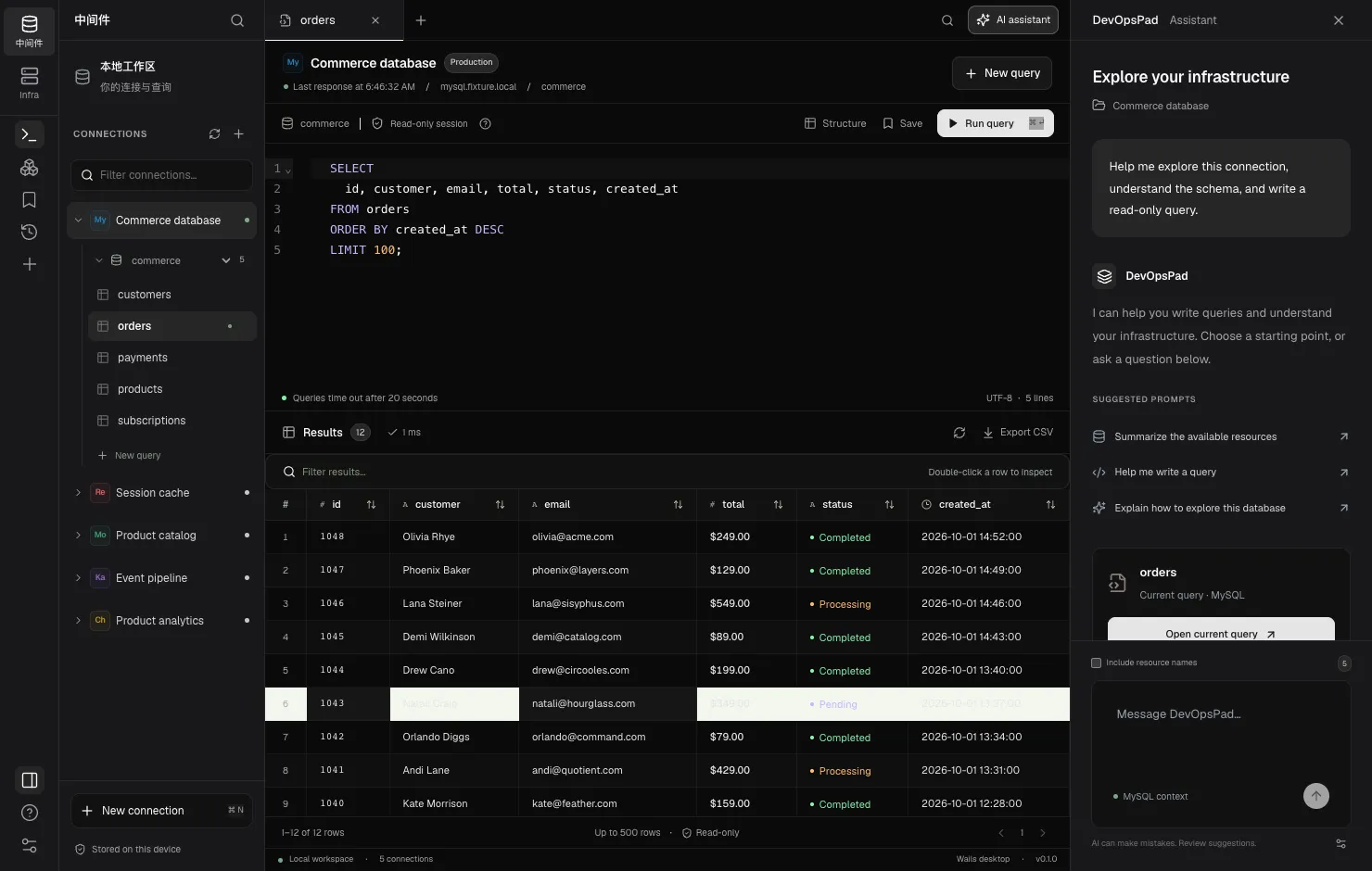
Navicat is a full database IDE: you can edit data, design schemas, transfer and synchronize databases, and schedule backups across many SQL engines. DevOpsPad deliberately does much less with databases. It has no editing features and runs queries in read-only modes, but the same window also covers Kafka metadata, ClickHouse, Kubernetes and K3s. If you need to change data or schemas, Navicat is the better tool. If you mostly need to look at production safely, and your stack runs on Kubernetes, DevOpsPad covers more ground with fewer ways to break things.
DevOpsPad’s early plan borrowed Navicat’s connection tree and query flow as a reference, and its current direction keeps the database side read-only. This comparison is about where each product is today.
At a glance
| Navicat Premium | DevOpsPad | |
|---|---|---|
| Primary job | Develop and administer databases | Inspect databases and clusters; release to K3s |
| Database engines | MySQL, MariaDB, PostgreSQL, SQL Server, Oracle, SQLite, MongoDB, Redis, Snowflake | MySQL, ClickHouse, MongoDB, Redis, plus Kafka metadata |
| Kubernetes / K3s | Not covered | Contexts, resources, events, Pod logs; Infra release console |
| Writes to databases | Yes: grid editing, DDL, import, sync, backup/restore | No editing features; read-only transactions (MySQL), readonly=1 (ClickHouse), command allowlist (Redis), find only (MongoDB) |
| Data modeling | Yes | No |
| SSH tunnel | Yes (and HTTP tunneling) | Yes, single hop, with host-key verification |
| Platforms | Windows, macOS, Linux | macOS on Apple silicon (signed); Windows/Linux from source, unverified |
Navicat’s engine list comes from navicat.com. Check there for the current version, because it changes between releases.
When to choose Navicat
- You edit data. Navicat’s grid editing, data transfer, data synchronization and structure synchronization are mature. DevOpsPad has no data editing, import or sync features.
- You design schemas. Visual table design and data modeling are core Navicat features. DevOpsPad can show columns, indexes and DDL, but it cannot change them.
- You run PostgreSQL, Oracle or SQL Server. DevOpsPad does not support them.
- You need Windows or Linux builds today. Navicat ships for all three desktop platforms. DevOpsPad’s only verified, signed build is macOS on Apple silicon.
- You need scheduled jobs, backups or reports. None of these exist in DevOpsPad.
When to choose DevOpsPad
- You debug production and want no way to write. MySQL queries run in a server-side read-only transaction. ClickHouse requests carry
readonly=1. Redis commands are checked against an allowlist of read-only commands. MongoDB queries arefinddocuments, not a shell. A mistypedDELETEfails instead of committing. MySQL DDL is the exception: it commits implicitly, so the transaction does not reliably block it, and a SELECT-only account is still needed. See read-only by design. - Your incident spans more than the database. When an API is slow, you often need the MySQL slow table, the Redis key TTLs, the Kafka partition leaders and the Pod logs, in that order. DevOpsPad has all of them in one Explorer, with the same SSH tunnel settings for each.
- You run ClickHouse or Kafka. DevOpsPad queries ClickHouse over HTTP and shows Kafka partition leaders and in-sync replicas.
- You want results that do not flood your laptop. Previews stop at 500 rows and 8 MiB, and queries time out after 20 seconds. That is a limit for data work, and a feature when you are pointing at a large production table.
- You want AI help without handing it your data. The assistant receives your prompt and the engine name. Resource names are only sent if you turn them on, and credentials and result rows are never sent. Suggestions are inserted into the editor; you decide whether to run them.
How they handle production safety
Navicat leaves this to you: use a read-only account, and be careful. That is a reasonable model for an IDE whose purpose is to change things. DevOpsPad takes a stricter position: it offers no editing features and runs each engine in its read-only mode, and you should still use a least-privilege account. The server’s permissions are the real boundary; the app’s read mode is a second layer that catches mistakes.
DevOpsPad stores database passwords, SSH passwords and key passphrases as separate OS keychain entries and never returns saved secrets to its UI. If the keychain is unavailable, saving fails rather than falling back to a plaintext file.
Using both
A common split is Navicat on the developer workstation for schema work and local data, and DevOpsPad for staging and production access. The two do not conflict: each keeps its own connection profiles, and DevOpsPad’s profiles live in ~/Library/Application Support/DevOpsPad/workspace.json with secrets in the keychain.
If you are choosing only one and your work is mostly writing SQL that changes data, choose Navicat. If it is mostly reading, across databases and clusters, try DevOpsPad: start with connecting MySQL or browse the connector list.