
An AI assistant that never sees your credentials or your data
Ask an OpenAI-compatible or local model for queries. Only your prompt is sent by default; credentials and result rows never are, and nothing auto-runs.
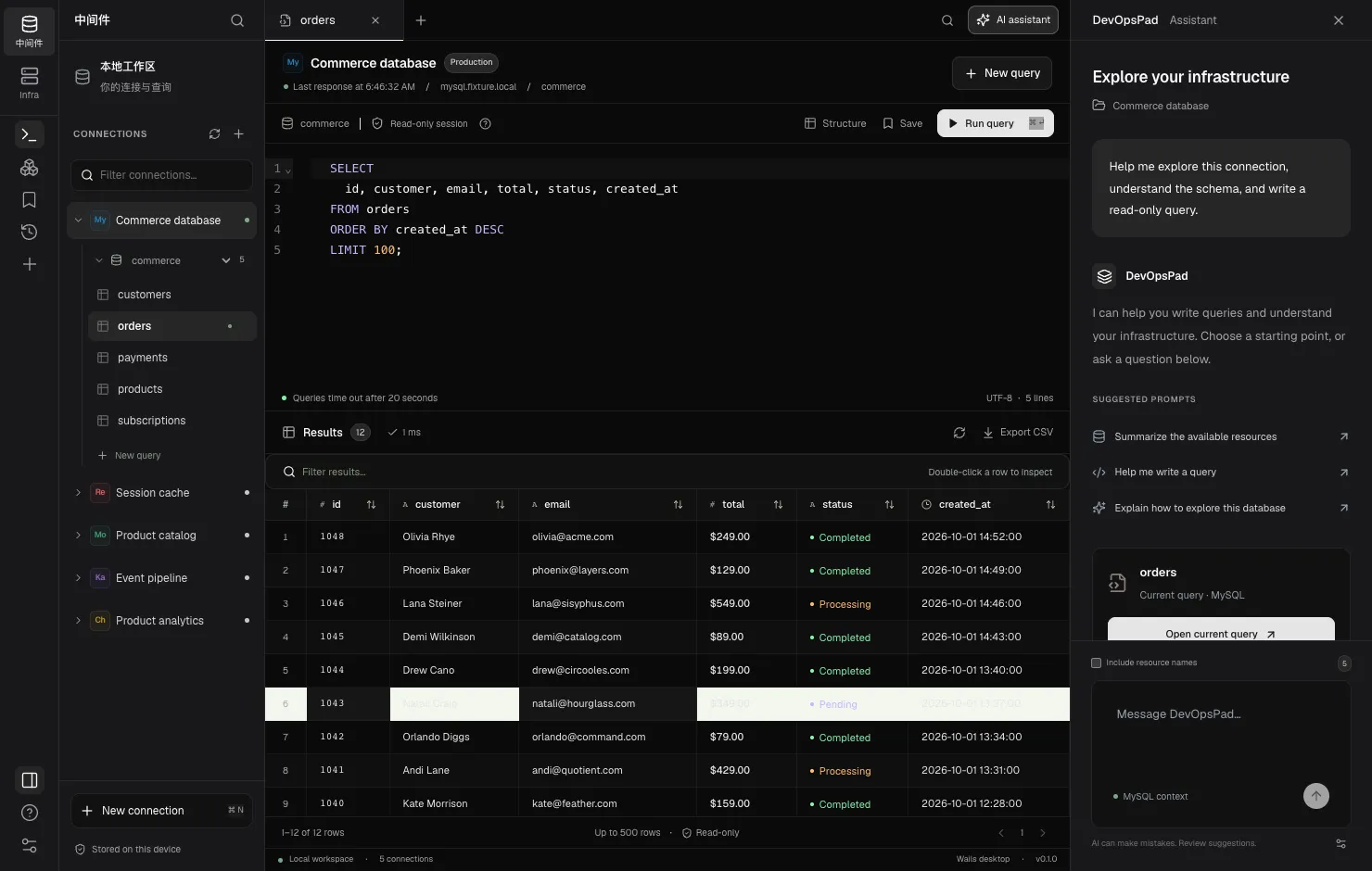
What it is
The assistant is a collapsible panel beside the workbench; open it with AI assistant in the toolbar. Ask it to write a query, explain a result or suggest how to explore a database, and it answers using a model you choose. A Suggested prompts list gives quick starting points, and the panel always shows which connection and engine it is working with.
DevOpsPad doesn’t ship or host a model. Under Settings, enter an API base URL, a Model ID and an optional API key for any OpenAI-compatible provider — a hosted API or a local model such as Ollama on localhost.
What is sent
By default, each request contains your prompt and the engine name. That’s all.
| Data | Sent? |
|---|---|
| Your prompt | Yes |
| Engine name (for example MySQL) | Yes |
| Visible resource names (tables, keys, topics) | Only if you tick Include resource names |
| Credentials, passwords, API keys | Never |
| Query results and rows | Never |
| Pod log output | Never |
Each prompt is independent; earlier chat messages aren’t sent as context. Because resource names don’t include column definitions, review generated SQL before running it. Details are in what the AI sends.
How suggestions reach the editor
Code blocks in an answer have an Insert into editor button. The query goes into the current tab, where you can read and edit it. It never runs automatically, and the workbench’s read-only enforcement still applies when you do run it.
Provider safety
- HTTPS is required, except for loopback HTTP endpoints such as
http://localhost:11434/v1. - Redirects are not followed.
- The API key lives in the OS keychain. Changing the endpoint without entering a new key removes the old key, so one provider’s key is never sent to another.
- Provider URL and key are read together as one snapshot.
AI agents outside the app
Coding agents such as Claude Code or Codex can also report their build and release work to DevOpsPad through devopspadctl. See AI run records.
Limits
No streaming responses, multi-turn context or schema-aware column context yet. The assistant suggests; it doesn’t execute.
Help articles
Configure an AI provider
Connect the DevOpsPad AI assistant to any OpenAI-compatible Chat Completions endpoint by setting the API base URL, model ID and an optional API key.
Use a local AI model
Run the DevOpsPad AI assistant against a model on your own machine, such as Ollama, over loopback HTTP so prompts never leave your laptop.
What DevOpsPad sends to the AI provider
Exactly what each AI assistant request contains, when resource names are included, and why credentials, query results and logs are never sent.
Insert an AI suggestion into the editor
Move a query from the DevOpsPad AI assistant into the editor with one click, review it and run it yourself. Suggestions never execute automatically.
Record AI builds and releases in DevOpsPad
Let an AI agent report build and release steps with devopspadctl runs record. Successful builds become artifacts; records are idempotent and validated.
Frequently asked questions
Which AI providers can I use?
Any endpoint that implements the OpenAI-compatible /chat/completions API, including local servers such as Ollama. You supply the base URL, the model ID and, if needed, an API key.
Does the assistant run queries for me?
No. Suggestions can be inserted into the editor with Insert into editor, and you decide whether to run them.
Is my API key stored safely?
Yes. The API key is stored in the OS keychain, not in a configuration file, and it is removed if you change the provider endpoint without entering a new key.