
Dry-run plans and leases for desktop Kubernetes releases
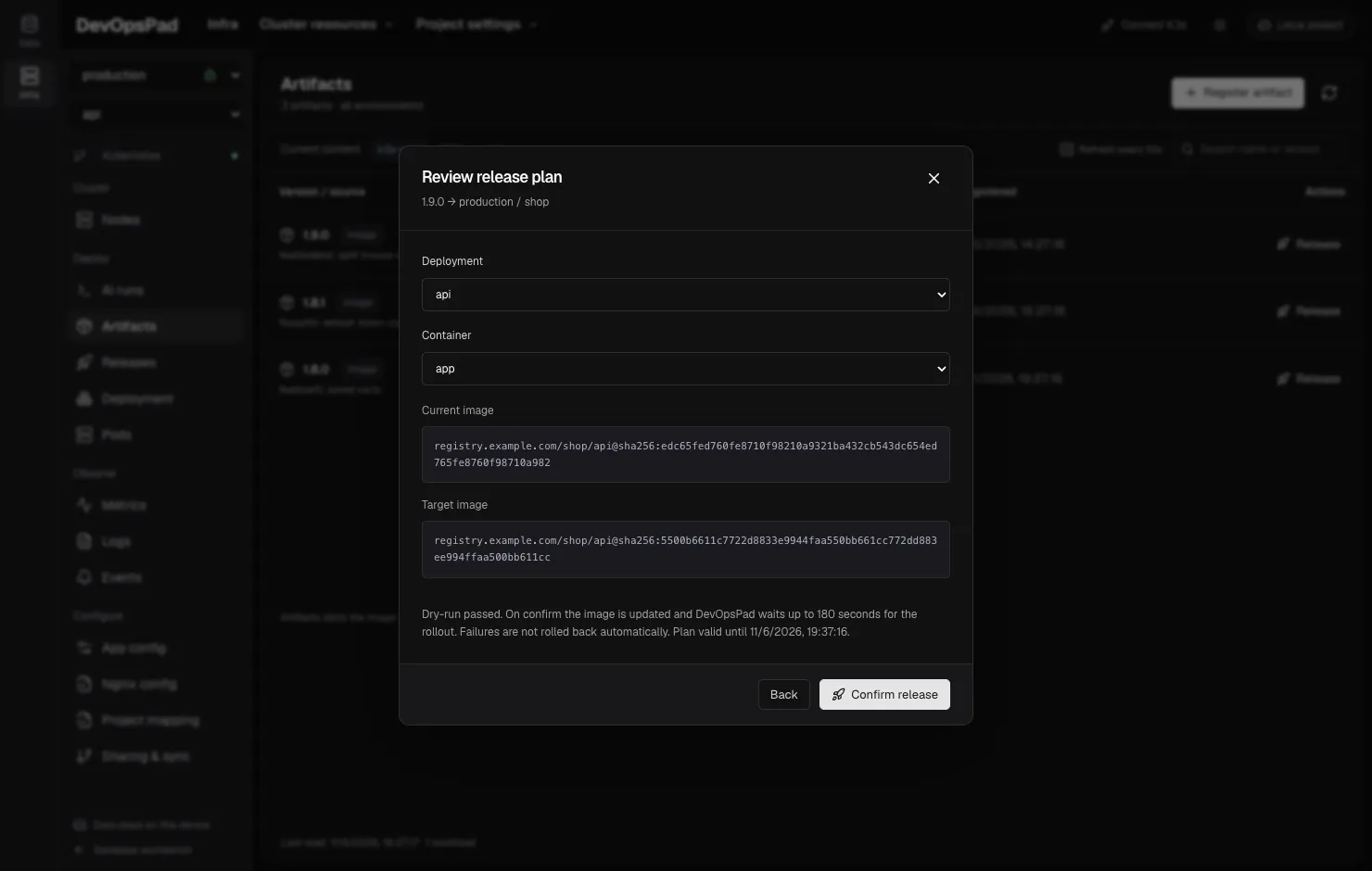
DevOpsPad’s Infra console can change a K3s or Kubernetes Deployment: release a new image, scale, restart, or roll back to an earlier release. It does this from a desktop app, with no controller in the cluster and no server of our own. That rules out the usual safety net of a central deploy service that serialises changes. This post explains what replaced it: a plan you review, a server-side dry-run, a Lease in the target namespace, and resource-version checks before and during the change.
The problem
Two people, or one person and a CI job, can act on the same Deployment at the same time. The cluster state can also change between when you look at it and when you click. The failure modes we wanted to rule out:
- applying a change computed from a stale view of the Deployment,
- two DevOpsPad clients releasing the same Deployment concurrently,
- reporting “succeeded” when the rollout never became ready,
- retrying an uncertain update automatically and making things worse.
The design
1. Plan first, with a server-side dry-run
Every action starts as a plan. DevOpsPad reads the Deployment and checks that:
- its Pod template labels match the application’s selector, so you cannot release one app’s image into another app’s Deployment,
- it is not paused,
- the target container exists, and the new image differs from the current one,
- for scaling, the replica count is in 0–1,000 and actually changes.
It then builds the updated object and sends it to the API server with dryRun=All. Admission webhooks, validation and quota run exactly as they would for the real update, and nothing is persisted. If the dry-run fails, there is no plan.
The plan shows what you are about to do: namespace, Deployment, container, the current image and the target image (or current and target replicas). It also pins the Deployment’s UID and resourceVersion and the cluster endpoint it was read from.
2. Plans are single-use and expire
A plan lives only in the running app’s memory. It expires after 10 minutes and is deleted the moment you execute it, so the same plan cannot be applied twice. At most 100 plans can be pending. A plan is not a file that someone could edit or replay later.
3. A Lease per Deployment
When you confirm, DevOpsPad first acquires a coordination.k8s.io/v1 Lease in the target namespace. Its name is derived from a hash of the Deployment name, so every DevOpsPad client releasing the same Deployment contends for the same Lease. The Lease’s holder is the plan ID, with a 300-second duration and no renewal. If another holder’s Lease is still valid, the release stops with “being released by another client”.
The whole apply is bounded to 180 seconds, below the Lease lifetime, so a release never outlives its lock. When it finishes, the Lease is released, but only if this plan still holds it.
4. Check again, then update
Holding the Lease, DevOpsPad reads the Deployment again. If the UID or resourceVersion differs from the plan, someone changed it after you reviewed the plan, and the release stops and asks for a new plan. The update itself also carries the resourceVersion, so the API server rejects it if anything slipped in between.
Image updates and restarts add a devopspad.io/release: <plan-id> annotation to the Pod template, which makes every rollout traceable to its record. Scaling deliberately leaves the Pod template untouched, because changing it would trigger an unintended rollout.
5. Verify the rollout
After the update, DevOpsPad polls every 2 seconds until the controller has observed the new generation and updated, available and total replicas all equal the desired count. A Deployment that reports ProgressDeadlineExceeded is recorded as failed. If the Deployment’s generation changes under it, meaning another actor modified it mid-rollout, that is reported too.
6. Write down what happened, honestly
Each step is appended to a local release record as it happens: lease acquired, pre-check passed, Deployment updated, ready. Three rules govern outcomes:
- If the update response is lost (a timeout or a dropped connection), the record says the update is unconfirmed and asks you to check the cluster. It is never retried automatically.
- A failed rollout is not rolled back automatically. You decide, with a rollback that is itself a new plan.
- If a record cannot be written, execution stops. A change already accepted by the cluster cannot be undone by that, and the error says so.
A rollback takes a successful release record’s image digest and runs it through the same pipeline: a fresh plan against the current state, which changes only that container’s image.
Trade-offs and limits
- The Lease only coordinates DevOpsPad clients.
kubectl, Helm or Argo CD do not know about it. TheresourceVersionchecks still protect against them, but they will not wait for the lock. - Clocks matter. Lease validity is computed from timestamps, so clients need reasonably synchronised clocks.
- A crash leaves the lock until it expires. No renewal means no stuck heartbeat, but also up to five minutes before someone else can retry.
- Deployments only. StatefulSets and DaemonSets can be viewed but not changed from this path, and a release changes one container’s image at a time.
- Records are local files shared through Git when you push them, not a tamper-proof audit log.
- Permissions: the identity needs
updateon Deployments andget/create/updateon Leases in that namespace.
What’s next
The repository’s roadmap plans to move all write paths (Deployment actions, ConfigMap saves and host Nginx changes) into one action engine with this same plan → apply → verify → record shape, and to add policy and approval before AI agents get any write tools. That is the direction, not a shipped feature.
Day-to-day use is in releasing an image, scale and restart and rolling back a release. For the RBAC side, see RBAC permissions and the safe releases feature page.