
Scale or restart a Deployment
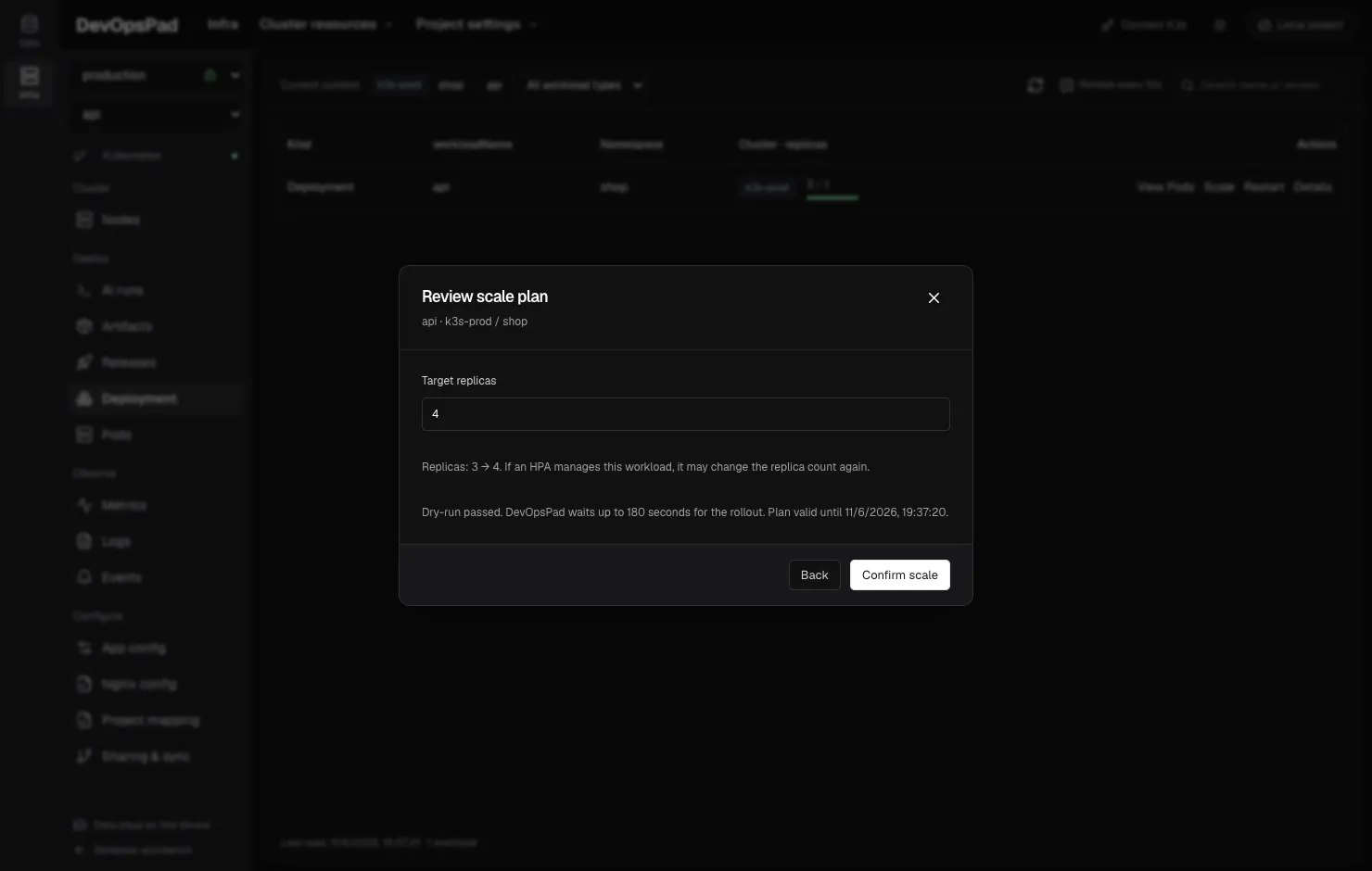
On the Deployment page, each row has Scale and Restart actions. Both open a dialog, generate a plan with a server-side dry-run when you click Create plan, and only change the cluster after you confirm. DevOpsPad then waits for the Deployment to become ready, for up to 180 seconds, and writes a record.
Scaling changes only spec.replicas. Restarting changes only a Pod template annotation. Neither changes the image.
Scale
- Open Deployment in the Infra sidebar and find the row.
- Click Scale.
- Enter Target replicas, an integer from 0 to 1,000. The dialog shows the current replica count.
- Click Create plan. The confirmation shows the change, for example
Replicas: 2 → 0. - Confirm. DevOpsPad applies the change and waits until the updated, available and total replicas match.
Setting replicas to 0 stops every Pod of that Deployment; the dialog warns you (“Setting 0 stops every Pod of this Deployment.”). Scaling does not trigger a rolling update, because the Pod template is unchanged. If a HorizontalPodAutoscaler manages the Deployment, it may change the replica count again.
Restart
- Click Restart on the Deployment row.
- Read the description: DevOpsPad updates a Pod template annotation and Pods are recreated according to the Deployment’s update strategy, keeping the image and replica settings.
- Click Create plan, review, and confirm.
This is the same mechanism as kubectl rollout restart: the devopspad.io/release annotation changes, so the controller rolls out new Pods. Use it after editing a ConfigMap that is consumed through environment variables or a subPath mount, since those need a restart to take effect (see application config).
Safeguards
Both actions use the same engine as image releases:
- The plan is bound to the Deployment UID and
resourceVersion, lives in memory for 10 minutes and can be executed once. - A per-Deployment Lease prevents two DevOpsPad clients from changing the same Deployment at once.
- The UID and
resourceVersionare checked again right before the write. - Records in Releases show the action as Scale or Rolling restart. Scale records keep both the previous and new replica counts.
A timeout or concurrent change marks the operation as incomplete. DevOpsPad does not retry it.
Limits
Only Deployments can be scaled or restarted here. StatefulSets and DaemonSets are read-only in the Infra console.
Frequently asked questions
What happens if I scale a Deployment to 0?
All of its Pods are stopped. The Deployment, its image and its configuration stay in place, so you can scale it back up later.
Will my manual replica count stick if the Deployment has an HPA?
Not necessarily. A HorizontalPodAutoscaler can change the replica count again after DevOpsPad sets it.